Wazuh Engineering Series | Part 2: Parsing, Rule Authoring & Cross-Layer Correlation
A detection engineering masterclass: from raw Syslog bytes to a Level 10 correlated SQL Injection alert—custom decoders, XML rule authoring, global_frequency mechanics, and validated end-to-end correlation inside Wazuh analysisd.
1. The Problem with Raw Telemetry
In Part 1 of the Wazuh Engineering Series, we built and validated the full physical and logical SOC architecture for the APEX HUNTERS lab environment—pfSense with Snort NIDS, a Wazuh all-in-one manager, a Windows 10 EDR endpoint, and an Ubuntu DVWA web server. We confirmed two independent log transport paths: Snort network telemetry flowing over Syslog UDP/514, and host-based agent telemetry flowing over the encrypted Wazuh channel TCP/1514. If you haven’t read that post, the foundational topology is also documented in Building a Mini SOC Environment.
Log bytes arriving at the manager is a prerequisite—not an outcome. Raw telemetry by itself is operationally worthless until the SIEM can parse it into structured fields, evaluate those fields against detection logic, and escalate meaningful signals above the noise floor. This post documents the engineering work that makes that possible: custom decoders, XML rule authoring, and cross-layer correlation.
The Fundamental Limitation of Single-Source Detection
A Snort NIDS alert for an SQL Injection pattern confirms one thing and one thing only: a malicious payload crossed the network boundary. It cannot tell you whether the payload reached the application layer, whether the web server processed it, or whether the database returned rows to an attacker. A Wazuh EDR alert matching an SQLi pattern in Apache’s access log confirms the opposite side: the request reached the host. But it cannot independently confirm that the same request was observed at the perimeter.
Alerting on every NIDS signature hit produces alert fatigue that destroys analyst effectiveness. Alerting only on host-side anomalies misses network-boundary context entirely. The engineering solution is cross-layer correlation: requiring that both the network-side NIDS and the host-side EDR independently observe the same attack before escalating to high severity. This is the foundational design decision behind every use case in this chapter.
2. The Wazuh analysisd Data Pipeline
Every event processed by Wazuh—whether it arrives from an agent over TCP/1514 or from a syslog forwarder over UDP/514—is handled by a single daemon: wazuh-analysisd. Understanding its internal pipeline is not optional background reading. It is a hard engineering prerequisite. A rule that references a field that no decoder has extracted will fail silently, producing zero alerts regardless of how precisely its conditions match the threat pattern.
The pipeline has five stages:
1
2
3
4
5
6
7
8
9
10
11
12
13
14
15
16
17
18
19
20
21
22
23
24
25
26
27
28
29
30
31
32
33
34
35
36
37
38
Telemetry Ingestion
  ├── Syslog UDP/514     (pfSense/Snort → Wazuh Manager, attributed Agent 000)
  └── Agent TCP/1514     (Endpoint agents → Wazuh Manager, attributed Agent 00x)
          │
          ▼
┌─────────────────────────────────────────┐
│  Stage 1: Prematch String Evaluation    │
│  Fast-path string check before regex.   │
│  No match → entire decoder family skip. │
└─────────────────────────────────────────┘
          │
          ▼
┌─────────────────────────────────────────┐
│  Stage 2: Decoder Field Extraction      │
│  Regex / PCRE2 capture groups → named   │
│  schema fields: srcip, url, user, id…   │
└─────────────────────────────────────────┘
          │
          ▼
┌─────────────────────────────────────────┐
│  Stage 3: Hierarchical Rule Matching    │
│  Evaluate if_sid, if_group, decoded_as, │
│  overwrite="yes" chains top-down.       │
└─────────────────────────────────────────┘
          │
          ▼
┌─────────────────────────────────────────┐
│  Stage 4: Frequency / Correlation       │
│  global_frequency state table counting  │
│  across agents within timeframe window. │
└─────────────────────────────────────────┘
          │
          ▼
┌─────────────────────────────────────────┐
│  Stage 5: Alert Indexing                │
│  Write alerts.json → OpenSearch index → │
│  Wazuh Dashboard Security Events view.  │
└─────────────────────────────────────────┘
Stage 1: Prematch—Why It Exists
At production EPS (Events Per Second) rates, executing PCRE2 regex against every inbound log line is computationally prohibitive. The <prematch> directive solves this with a fast Boyer-Moore string search. Before any regex is attempted, analysisd checks whether the literal prematch string appears anywhere in the raw log line. If it doesn’t, the entire decoder family is skipped in nanoseconds.
For a Snort syslog alert containing DVWA SQLi attempt, only one decoder family in the entire decoder library—the one with <prematch>DVWA SQLi attempt</prematch>—will even be entered. Everything else is bypassed. This is not a correctness mechanism; it is a throughput mechanism. Get prematch strings wrong and you pay a CPU penalty. Get them right and decoder evaluation is effectively free for non-matching event types.
Stage 2: Decoder Field Extraction—The Bridge Between Text and Structure
The decoder’s job is to transform an opaque raw log string into a structured event with named, typed fields. Every downstream rule condition—<url>, <srcip>, <id>, <match>—operates against the decoded field values, not against the raw text. If the decoder doesn’t extract a field, that field simply doesn’t exist for rule evaluation purposes. This is the single most common source of silent rule failures in custom Wazuh deployments.
Wazuh ships an extensive library of built-in decoders covering Windows Event Log (extracting win.system.eventID, win.eventdata.targetUserName, etc.), Apache/Nginx web-log (extracting srcip, url, id for HTTP status code, size), auditd, and dozens more. For non-standard formats—like custom Snort syslog alerts—you author custom decoders.
Stage 3: Hierarchical Rule Evaluation
Rules are evaluated top-down in a dependency chain. A rule with <if_sid>31100</if_sid> only enters the evaluation engine if rule 31100 has already fired on this event. A rule with overwrite="yes" replaces a previously matched rule when its own conditions are also satisfied. A rule with <decoded_as>snort</decoded_as> is restricted to events parsed by the snort decoder family. This hierarchy is not incidental—it is the mechanism that enables progressive refinement from broad category detection to specific subcategory confirmation.
Stage 4: Correlation and Frequency Counting
This stage is where cross-layer detection becomes possible. Frequency-based rules (those with frequency and timeframe attributes) maintain a sliding-window state table in memory. When N events matching a defined group arrive within T seconds, the correlation rule fires. The critical parameter for NIDS-plus-EDR correlation is <global_frequency />, and its importance cannot be overstated.
By default, frequency counting is scoped per agent ID. A Snort alert arrives attributed to Agent 000 (the Wazuh manager’s built-in syslog receiver agent). An Apache access log alert arrives attributed to Agent 002 (the DVWA Ubuntu endpoint). Without <global_frequency />, these two events live in completely separate frequency buckets and will never jointly satisfy a threshold of 2. <global_frequency /> collapses all agent-scoped buckets into a single global counter for the specified group, making cross-source correlation possible.
Stage 5: Alert Indexing and Lineage
When a rule fires, the resulting alert object contains: the raw log line, all decoded fields, rule metadata (ID, level, description, groups, MITRE ATT&CK IDs), and agent metadata. For correlation rules specifically, the alert carries references to the constituent child alerts that satisfied the frequency threshold—the NIDS alert and the EDR alert that together triggered the Level 10 event. This lineage is what allows a SOC analyst to open a single high-priority alert and trace it back to its individual evidence components, verifying the detection logic without needing to pivot to separate search queries.
3. Detection Engineering Reference: Decoder and Rule XML
Before examining the SQL Injection use case in detail, here is the authoritative XML reference for the components used throughout this post.
3.1 Decoder Directives
All custom decoders go in /var/ossec/etc/decoders/local_decoder.xml. Restart wazuh-manager or run wazuh-logtest after every change—decoders are loaded at startup.
1
2
3
4
5
6
7
<decoder name="snort_sqli">
  <!-- Required: fast-path string that must exist in the raw log line -->
  <prematch>DVWA SQLi attempt</prematch>

  <!-- Optional: extract named fields using PCRE2 inline named groups -->
  <pcre2>Client:\s+(?<srcip>\d+\.\d+\.\d+\.\d+)</pcre2>
</decoder>
| Directive | What It Does |
|---|---|
<decoder name="..."> | Unique decoder identifier, referenced by rules via <decoded_as> |
<prematch> | Literal string that must appear in the raw log before regex is attempted |
<parent> | Inherit a parent decoder’s prematch; used for multi-stage decoders |
<regex> | POSIX ERE extraction pattern; capture groups mapped by <order> |
<pcre2> | PCRE2 extraction pattern; use inline (?<fieldname>...) named groups |
<order> | Comma-separated field names mapping positional <regex> capture groups |
Engineering Note: Prefer <pcre2> with named capture groups over <regex> + <order>. The named group syntax eliminates the index-order coupling bug where adding a new capture group shifts all subsequent field assignments silently.
3.2 Rule Directives
All custom rules go in /var/ossec/etc/rules/local_rules.xml. Custom rule IDs must fall in the 100000–120000 range (Wazuh-reserved range for user-defined rules).
1
2
3
4
5
6
7
8
9
10
11
12
13
<group name="custom_nids,sqli_detection,">

  <rule id="100900" level="6">
    <decoded_as>snort_sqli</decoded_as>
    <match>DVWA SQLi attempt - HTTP URI match</match>
    <description>Snort NIDS Alert — DVWA SQL Injection attempt at perimeter</description>
    <group>snort,sql_injection,attack,sqlinjection</group>
    <mitre>
      <id>T1190</id>
    </mitre>
  </rule>

</group>
| Directive | What It Does |
|---|---|
id="..." | Unique rule integer ID |
level="..." | Severity 0–15; 0 = ignore, 6 = medium, 10 = high, 15 = critical |
<decoded_as> | Restrict evaluation to events from the named decoder |
<match> | Literal string that must appear in the full_log field |
<url> | Match against the url decoded field (supports regex alternatives with \|) |
<if_sid> | This rule only evaluates if the referenced parent rule already fired |
<if_matched_group> | Frequency counting: watch for events in this group |
frequency (attr) | Number of matching events required to fire the correlation rule |
timeframe (attr) | Sliding window in seconds within which frequency events must occur |
<global_frequency /> | Count matching events across all agents, not per-agent |
<same_srcip /> | Additional constraint: all counted events must share the same srcip |
overwrite="yes" | Replace a built-in default rule with this custom definition |
<group> | Tag the event with classification labels—critical for correlation |
<mitre><id>...</id></mitre> | Map to MITRE ATT&CK technique IDs |
4. Use Case: Correlated SQL Injection Detection (UC-SQLI-2025-001)
4.1 Threat Scenario
Use Case ID: UC-SQLI-2025-001
MITRE Tactic: TA0001 — Initial Access
MITRE Technique: T1190 — Exploit Public-Facing Application
Compliance: PCI-DSS 6.5, 6.5.1, 11.4 · GDPR IV_35.7.d · NIST 800-53 SA.11, SI.4
An attacker on the Kali Linux machine at 30.30.30.2 targets the DVWA web application at 20.20.20.2. Using a browser, sqlmap, or curl, they send the following HTTP GET request:
1
2
GET /DVWA/vulnerabilities/sqli/?id=%27+or+1%3D1--&Submit=Submit HTTP/1.1
Host: 20.20.20.2
The URL-encoded payload %27+or+1%3D1-- decodes to ' or 1=1--—a classic tautological SQL injection that attempts to bypass the application’s WHERE clause by injecting an always-true condition. The traffic transits through pfSense, where Snort inspects packet payloads. Simultaneously, the request reaches the DVWA Apache web server, which logs it to /var/log/apache2/access.log.
Two completely independent telemetry systems—one network-boundary (NIDS), one host-boundary (EDR)—observe the same attack. The engineering objective is to fuse these two signals into a single correlated high-confidence alert.
1
2
3
4
5
6
7
8
9
10
11
12
13
14
15
16
17
18
19
20
21
22
23
24
25
[ Attacker: 30.30.30.2 ]
         │
         │  GET /DVWA/vulnerabilities/sqli/?id=%27+or+1%3D1--
         ▼
┌──────────────────────────────────┐
│  pfSense + Snort NIDS            │──Syslog UDP/514──► Wazuh Manager (Agent 000)
│  sid:2000001 fires               │                         │ snort_sqli decoder
└──────────────────────────────────┘                         │ Rule 100900, Level 6
         │                                                   │ Group: sqlinjection
         │ packet forwarded
         ▼
┌──────────────────────────────────┐
│  DVWA Ubuntu (20.20.20.2)        │──Agent TCP/1514──► Wazuh Manager (Agent 002)
│  Apache logs access.log entry    │                         │ web-log decoder
└──────────────────────────────────┘                         │ Rule 31164, Level 6
                                                             │ Group: sqlinjection
                                                             │
                                                     global_frequency counter
                                                     reaches threshold = 2
                                                             │
                                                             ▼
                                              ┌──────────────────────────────┐
                                              │  Rule 100911 — Level 10      │
                                              │  Confirmed SQLi Correlated   │
                                              └──────────────────────────────┘
4.2 Data Sources
| Detection Layer | Source System | Log File | Transport |
|---|---|---|---|
| NIDS (Network) | pfSense + Snort | Snort syslog alerts | UDP/514 → Agent 000 |
| EDR (Host) | DVWA Ubuntu 20.20.20.2 | /var/log/apache2/access.log | TCP/1514 → Agent 002 |
| EDR (Host) | DVWA Ubuntu 20.20.20.2 | /var/log/apache2/error.log | TCP/1514 → Agent 002 |
4.3 Stage 1: Network Perimeter Detection (Snort NIDS)
The Snort Rule on pfSense
On pfSense, Snort is configured with a custom rule (sid:2000001) that matches HTTP traffic targeting the DVWA SQLi endpoint. When a packet matches, Snort writes a structured alert to the pfSense syslog subsystem, which is forwarded to the Wazuh manager. The raw syslog line arriving at the manager looks like:
1
DVWA SQLi attempt - HTTP URI match [Client: 30.30.30.2]
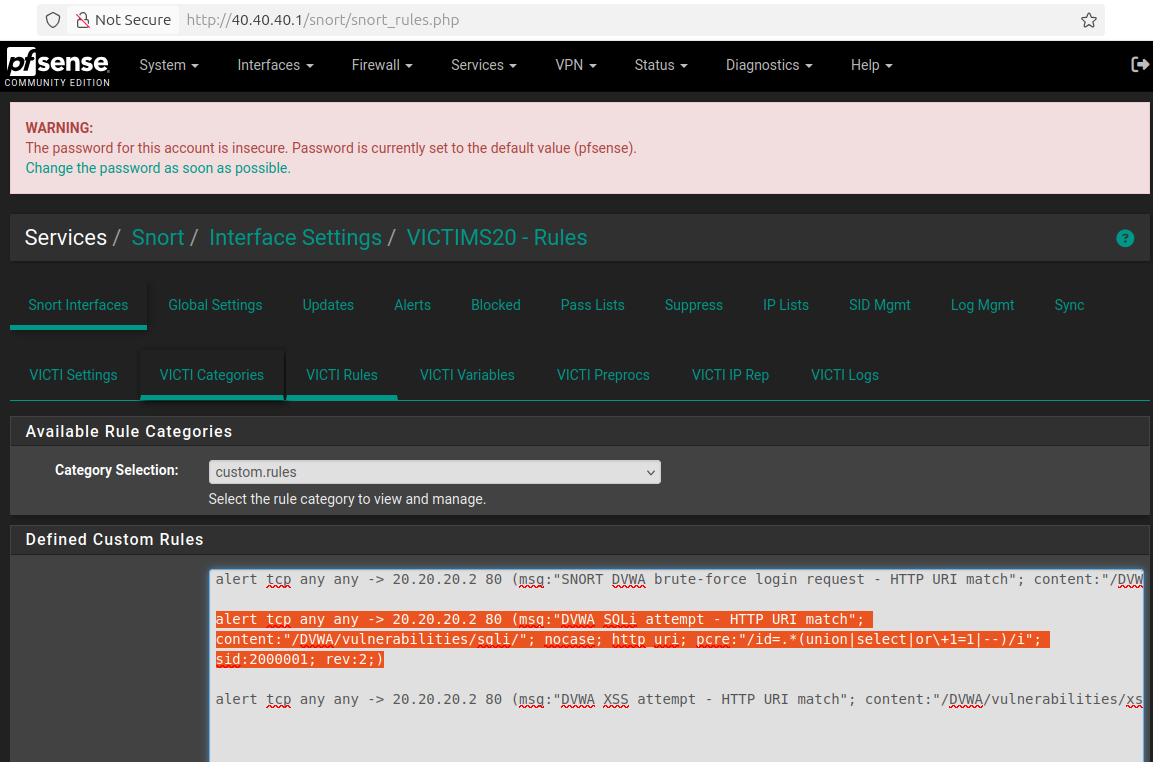 Figure 1: Snort rule configuration for SQLi detection on pfSense — the
 sid:2000001 rule monitors HTTP traffic targeting the DVWA SQLi endpoint and triggers on URI pattern matches containing SQL keywords.
The Custom Decoder
Wazuh’s built-in decoder library has no knowledge of this custom Snort alert format. We author a decoder in /var/ossec/etc/decoders/local_decoder.xml:
1
2
3
<decoder name="snort">
  <prematch>DVWA SQLi attempt</prematch>
</decoder>
The <prematch> directive is deliberately narrow. It matches only Snort alerts containing the literal string DVWA SQLi attempt—not generic Snort alerts, not other custom rules, not other syslog sources. Any event without this exact string will skip this decoder entirely in the prematch phase, at zero CPU cost.
Because all the context we need for rule matching exists in the full log message (specifically, the match string DVWA SQLi attempt - HTTP URI match), we don’t need a <regex> or <pcre2> field extraction stage for this particular decoder. The rule will match against the raw full_log field using <match>.
 Figure 2: Custom Snort decoder for SQLi alerts as configured in the Wazuh manager’s
 local_decoder.xml — the prematch string DVWA SQLi attempt is the fast-path gate that routes Snort alerts into this decoder family.
The NIDS Alert Rule
We define rule 100900 in /var/ossec/etc/rules/local_rules.xml:
1
2
3
4
5
6
7
8
9
<rule id="100900" level="6">
  <decoded_as>snort</decoded_as>
  <match>DVWA SQLi attempt - HTTP URI match</match>
  <description>Snort Alert - DVWA SQL Injection attempt detected</description>
  <group>snort,sql_injection,attack,local,sqlinjection</group>
  <mitre>
    <id>T1190</id>
  </mitre>
</rule>
Why <decoded_as>snort? The rule is restricted to events parsed by the snort decoder. This prevents the rule from accidentally firing on any other event that happens to contain the match string in a different context.
Why level="6" and not higher? A single NIDS alert for an SQLi payload is a suspicion, not a confirmation. The Snort rule fires on packet content alone—it has no knowledge of whether the payload reached the application, whether the server returned a successful response, or whether the attack was actually executed. Level 6 (medium) accurately represents this confidence level. The Level 10 escalation only happens after the EDR corroborates the observation.
The critical element is <group>: The tag sqlinjection in this group list is the correlation key. The correlation rule (rule 100911, described later) listens specifically for events tagged with the sqlinjection group. Without this tag, rule 100900’s alerts would never be counted toward the correlation threshold.
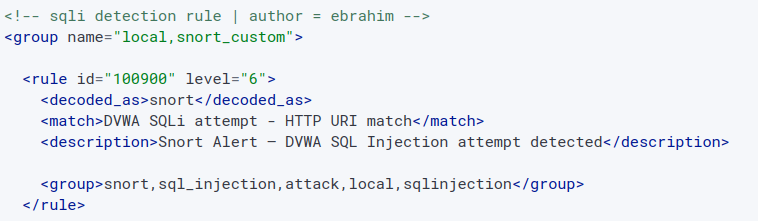 Figure 4: Rule 100900 in
 local_rules.xml — note the sqlinjection group tag which is the correlation key that links this NIDS alert to the cross-layer frequency counter.
4.4 Stage 2: Host-Side Detection (Wazuh EDR)
Apache Access Log Monitoring
The Wazuh agent on the DVWA host (20.20.20.2) is configured to monitor /var/log/apache2/access.log via a <localfile> block in ossec.conf:
1
2
3
4
<localfile>
  <log_format>apache</log_format>
  <location>/var/log/apache2/access.log</location>
</localfile>
When the SQLi request arrives and Apache processes it, the following line is written to the access log:
1
30.30.30.2 - - [timestamp] "GET /DVWA/vulnerabilities/sqli/?id=%27+or+1%3D1--&Submit=Submit HTTP/1.1" 500 -
The HTTP 500 status code indicates Apache received the request but the PHP application threw an error—specifically because the injected SQL syntax broke the database query. The Wazuh agent reads this line and forwards it to the manager over the encrypted TCP/1514 channel.
The Built-in Web-Log Decoder Chain
Unlike the Snort syslog events, Apache access logs are handled by Wazuh’s built-in web-log decoder, which understands the Combined Log Format natively. It extracts:
srcip→30.30.30.2url→/DVWA/vulnerabilities/sqli/?id=%27+or+1%3D1--&Submit=Submitid→500(HTTP response code)
The parent rule 31100 groups all web-log access messages at Level 0 (informational baseline):
1
2
3
4
5
6
<group name="web,accesslog,">
  <rule id="31100" level="0">
    <category>web-log</category>
    <description>Access log messages grouped.</description>
  </rule>
</group>
The child rule 31164 detects SQL injection by matching URL-encoded SQL keywords in the <url> field:
1
2
3
4
5
6
<rule id="31164" level="6">
  <if_sid>31100</if_sid>
  <url>=%27|select%2B|insert%2B|%2Bfrom%2B|%2Bwhere%2B|%2Bunion%2B</url>
  <description>SQL injection attempt.</description>
  <group>attack,sqlinjection,attack,...</group>
</rule>
Rule 31164 uses <url> to match against the decoded URL field specifically—not the full raw log string. The | delimiter in the <url> value functions as a regex alternation: the rule fires if the url field contains =%27 (URL-encoded single quote), or select%2B (SELECT+), or any of the other SQL keyword patterns.
The <if_sid>31100</if_sid> dependency chain is essential. Rule 31164 only evaluates if rule 31100 has already fired on this event, meaning it only evaluates web-log category events. This prevents the rule from accidentally matching SQL keywords in non-web-log contexts.
Critically, rule 31164 also assigns the sqlinjection group—the same group used by NIDS rule 100900. This shared group tag is the correlation bridge.
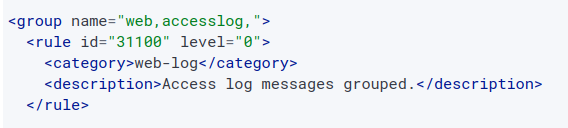 Figure 6: The built-in web-log rule chain — rule 31100 (parent, Level 0) groups all web access events, and rule 31164 (child, Level 6) matches URL-encoded SQL keywords. Both the NIDS rule (100900) and this EDR rule (31164) assign the
 sqlinjection group tag.
 Figure 3: Wazuh archive log (
/var/ossec/logs/archives/archives.log) showing both the Snort NIDS alert (decoded by the custom snort decoder, tagged sqlinjection) and the Apache EDR alert (decoded by the built-in web-log decoder, also tagged sqlinjection) within the 120-second correlation window.
4.5 Stage 3: The Cross-Layer Correlation Rule (100911)
This is the engineering centrepiece of the entire use case. Rule 100911 does not match individual events—it watches a group for frequency patterns across time and source boundaries.
1
2
3
4
5
6
7
8
9
10
11
<rule id="100911" level="10" frequency="2" timeframe="120">
  <if_matched_group>sqlinjection</if_matched_group>
  <global_frequency />
  <same_srcip />
  <description>Confirmed SQL Injection (Correlated NIDS + EDR)</description>
  <group>correlation,confirmed,sqlinjection,pci_dss_6.5,pci_dss_11.4</group>
  <mitre>
    <id>T1055</id>
    <id>T1190</id>
  </mitre>
</rule>
 Figure 5: Correlation rule 100911 in
 local_rules.xml — frequency="2" requires two sqlinjection-tagged events within timeframe="120" seconds; <global_frequency /> makes this count cross-agent; <same_srcip /> enforces that both events originate from the same attacker IP.
Anatomy of the Correlation Mechanics
frequency="2" and timeframe="120"
The rule fires when exactly 2 (or more) events belonging to the sqlinjection group arrive within a 120-second sliding window. The 120-second window is intentional: network-to-host log propagation latency, syslog buffering, and agent polling intervals mean that there can be a measurable delay between when Snort fires its alert and when the Apache log line reaches the manager. A window that is too narrow (e.g., 5 seconds) would miss legitimate correlations due to pipeline delays. A window that is too wide (e.g., 600 seconds) would increase the risk of false positive correlations from coincidental sequential attacks.
<global_frequency />—The Cross-Agent Counting Mechanism
Without this directive, analysisd maintains frequency counters segmented by agent ID. The Snort syslog event is attributed to Agent 000. The Apache access log event is attributed to Agent 002. In the default scoped-counting model, Agent 000’s counter reaches 1 and Agent 002’s counter reaches 1—but neither counter ever reaches 2, so rule 100911 never fires.
<global_frequency /> instructs analysisd to collapse all agent-scoped frequency buckets into a single global bucket for the sqlinjection group. Now both events—regardless of which agent they came from—increment the same counter. When the counter reaches 2 within 120 seconds, rule 100911 fires.
<same_srcip />—The Attacker IP Alignment Constraint
<global_frequency /> alone creates a subtle false-positive risk. Suppose Attacker A (30.30.30.2) triggers the Snort NIDS rule at T=0. Unrelated Attacker B (30.30.30.5) hits the DVWA web server with an SQLi pattern at T=60. Without <same_srcip />, both events count toward the global sqlinjection frequency bucket, and rule 100911 would fire at T=60—correlating two completely unrelated attackers into a single “confirmed attack” alert. This is a false positive caused by coincidental timing.
<same_srcip /> adds a binding constraint: events are only counted together if they share the same srcip decoded field. Now the correlation engine maintains separate per-IP counters within the global group bucket. Attacker A’s events only count toward Attacker A’s counter. Only when the same source IP appears in both a NIDS event and an EDR event within 120 seconds does the correlation fire. This is the design that produces genuine, high-confidence detections.
4.6 Alert and Triage Details
When rule 100911 fires, the resulting Level 10 alert in the Wazuh dashboard contains the following fields that an analyst needs for immediate triage:
| Alert Field | Expected Value | Significance |
|---|---|---|
rule.id | 100911 | Confirmed cross-layer correlation rule |
rule.level | 10 | High priority—immediate triage required |
rule.description | Confirmed SQL Injection (Correlated NIDS + EDR) | Human-readable confirmation |
rule.groups | correlation, confirmed, sqlinjection, pci_dss_6.5 | Classification for dashboards and reports |
rule.mitre.id | T1055, T1190 | MITRE ATT&CK mapping for threat intelligence |
data.srcip | 30.30.30.2 | Attacker IP—immediate block target |
data.url | /DVWA/vulnerabilities/sqli/?id=%27+or+1%3D1-- | Exact payload used |
agent.id | 002 | Host that received the attack |
4.7 Validation: End-to-End Test Execution
To validate the complete detection chain, the following controlled attack was executed from the Kali Linux machine at 30.30.30.2:
Method 1 — Browser:
Navigate to http://20.20.20.2/DVWA/vulnerabilities/sqli/, enter ' or 1=1-- in the User ID field, and click Submit.
Method 2 — curl:
1
curl "http://20.20.20.2/DVWA/vulnerabilities/sqli/?id=%27+or+1%3D1--&Submit=Submit"
Expected and Observed Sequence:
T+0s: Snort on pfSense matches the payload. Syslog alert forwarded to Wazuh. Rule 100900 fires → Level 6 alert, group:
sqlinjection. Global frequency counter increments to 1 for srcip30.30.30.2.T+0–5s: Apache on DVWA logs the request with HTTP 500. Agent forwards the log line. Rule 31164 fires → Level 6 alert, group:
sqlinjection. Global frequency counter increments to 2 for srcip30.30.30.2.T+5s (threshold met): Rule 100911 evaluates:
global_frequencycounter = 2 ≥frequency2, withintimeframe120s, withsame_srcip=30.30.30.2. → Level 10 alert fired: “Confirmed SQL Injection (Correlated NIDS + EDR)”.
The validation was successful. All three events were observed in the Wazuh dashboard in the expected sequence.
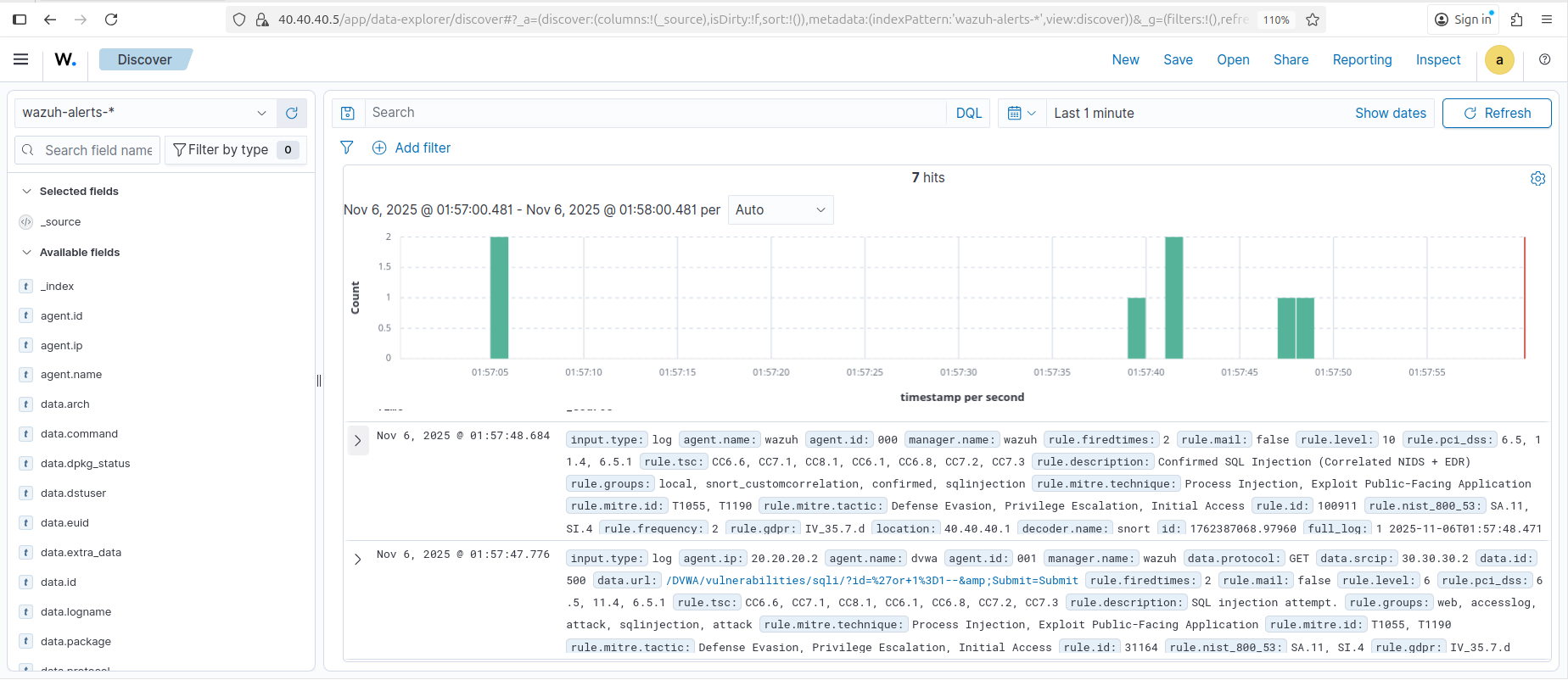 Figure 8: The Level 10 correlated alert (rule 100911) as it appears in the Wazuh Security Events dashboard — both constituent Level 6 child alerts (rule 100900 from Snort, rule 31164 from Apache) are visible in the timeline preceding the high-priority correlated event.
4.8 Incident Response Playbook
When rule 100911 fires, the following SOC standard operating procedure applies, structured according to the NIST SP 800-61r2 incident response lifecycle.
Phase 1 — Triage (Immediate, < 5 minutes)
Acknowledge the Level 10 alert (rule 100911). The dual-source correlation provides high confidence this is a genuine attack, not a false positive. Do not dismiss or deprioritize. Assign to Tier 1 analyst immediately.
Phase 2 — Investigation (< 30 minutes)
- Identify attacker IP (
data.srcip) and target host (agent.id,agent.ip). - Open the correlated child alerts: verify rule 100900 (Snort NIDS) and rule 31164 (Apache EDR) are both present.
- Examine
data.urlto extract the exact SQLi payload used. - Query the Wazuh archive for the full Apache access log entry. Check the HTTP response code (
data.id):HTTP 500→ Application received the payload but the malformed SQL caused a server error (partial execution risk).HTTP 200→ Application received the payload and returned a response (potential successful injection—maximum severity).
- Search
/var/log/apache2/error.logon the DVWA host formysqli_sql_exceptionor similar database error messages within the same timeframe. Their presence confirms the attack reached the database engine. - Review subsequent access.log entries from the same attacker IP to determine if they attempted data extraction after the initial injection probe.
Phase 3 — Containment (Immediate)
- Create a pfSense firewall block rule for
30.30.30.2on the external interface. Verify the rule is active and test connectivity from the Kali machine is denied. - If HTTP
200was confirmed (successful injection): escalate to Tier 2 and consider isolating the DVWA server from the internal network until the vulnerability is patched.
Phase 4 — Eradication and Recovery
- Notify the Web Application / Development team with: the vulnerable endpoint (
/DVWA/vulnerabilities/sqli/), the payload (' or 1=1--), and the database error evidence. - The remediation is parameterized queries (prepared statements). The fix must be validated with an application security test before the server is returned to service.
- Audit the application database for unauthorized modifications: new user accounts, modified records, dropped tables, or exfiltrated rows.
Phase 5 — Escalation and Reporting
- Document all findings in the incident ticket: attack timeline, attacker IP, payload, HTTP response code, database error presence/absence, containment actions taken.
- Escalate to SOC Lead and IR team if HTTP 200 was confirmed or database modifications are found.
- Update the correlation rule’s compliance group tags if this incident surfaces new regulatory implications.
5. Detection Engineering Tips
Tip 1: <same_srcip /> is Not Optional
As demonstrated in the correlation mechanics section, omitting <same_srcip /> from any <global_frequency /> correlation rule creates a false-positive scenario whenever two different attackers happen to trigger events in the same group within the timeframe window. This is not a theoretical edge case—in active environments with multiple concurrent scanners or penetration testers, coincidental timing is common. Always include <same_srcip /> unless you have an explicit and justified reason not to.
Tip 2: Use <pcre2> Named Groups Instead of <regex> + <order>
1
2
3
4
5
6
<!-- Fragile: adding a new capture group shifts all field assignments below it -->
<regex>Client: (\d+\.\d+\.\d+\.\d+) Port: (\d+)</regex>
<order>srcip, srcport</order>

<!-- Robust: each field is self-contained, order is irrelevant -->
<pcre2>Client:\s+(?<srcip>\d+\.\d+\.\d+\.\d+)\s+Port:\s+(?<srcport>\d+)</pcre2>
Named groups in <pcre2> are self-documenting, order-independent, and immune to the shift bug that silently mis-assigns fields when you add capture groups to an existing <regex> pattern.
Tip 3: overwrite="yes" Requires Preserving the <if_sid> Chain
When overwriting a built-in rule, you must include the original <if_sid> parent dependency in your custom version. If you drop <if_sid>31100</if_sid> from a web-log child rule, analysisd will no longer anchor the rule to the web-log decoder chain—the rule becomes a free-floating rule that either never fires (because it loses its parent context) or fires on the wrong event types.
Tip 4: Keep Correlation timeframe Between 60s and 180s
Under high EPS conditions, <global_frequency /> rules with very large timeframe values (e.g., 3600s = 1 hour) maintain proportionally larger in-memory state tables. At scale, this increases memory pressure and can cause old state entries to be evicted before the correlation window closes, causing missed detections. For NIDS-to-EDR correlation where the two events should arrive within seconds of each other, a timeframe of 60–180 seconds is both operationally sufficient and computationally safe.
Tip 5: Test Every Decoder Interactively Before Deploying
wazuh-logtest is the single most important debugging tool for detection engineering in Wazuh. Use it to validate decoder selection, field extraction, and rule evaluation before touching production:
1
/var/ossec/bin/wazuh-logtest
Paste in a representative raw log line:
1
DVWA SQLi attempt - HTTP URI match [Client: 30.30.30.2]
Expected output:
1
2
3
4
5
6
7
8
9
10
11
**Phase 1: Completed log inspection.
        full log: 'DVWA SQLi attempt - HTTP URI match [Client: 30.30.30.2]'

**Phase 2: Completed decoding.
        name: 'snort'

**Phase 3: Completed filtering (rules).
        id: '100900'
        level: '6'
        description: 'Snort Alert - DVWA SQL Injection attempt detected'
        groups: '['snort', 'sql_injection', 'attack', 'local', 'sqlinjection']'
If Phase 2 shows a decoder other than snort, or Phase 3 shows a different rule ID, the prematch string or the <decoded_as> binding is misconfigured. Fix it here before it silently fails in production.
6. The Correlated Alert: End Result
The culmination of the entire detection chain—two custom decoders, three rules (one NIDS, one EDR, one correlation), and the <global_frequency /> cross-agent counting mechanism—is a single, high-fidelity Level 10 event in the Wazuh dashboard. This alert carries the full evidence lineage: the Snort NIDS signal from the network perimeter, the Apache EDR signal from the host, the attacker IP, the exact payload, and the MITRE ATT&CK mapping. A SOC analyst can open this one alert and have everything they need to begin triage, containment, and investigation without pivoting to additional queries.
The Level 10 correlated alert (rule 100911, “Confirmed SQL Injection — Correlated NIDS + EDR”) generated in the Wazuh Security Events dashboard. The dual-source correlation produces an alert with maximum detection confidence: the same attacker IP was observed at both the network boundary (Snort) and the host boundary (Apache) within a 120-second window, triggering escalation from Level 6 individual suspicions to a Level 10 confirmed attack.
In Part 3, we will move from detection into automated response: configuring Wazuh Active Response to block attacking IPs at the firewall level within seconds of a Level 10 alert, and building NIST SP 800-61r2 incident response playbooks for SOC Tier 1 and Tier 2 analysts.